

The WordPress Snippet Box
⚠️ Read Before Copying and Pasting
These snippets are available to everyone, but copying and using our code requires understanding what you’re doing:
1. Back Up Everything: Make a backup of your files and database.
2. Know What You’re Doing: Understand the code before applying it.
3. Responsibility: You use this code at your own risk.
WooCommerce: Find products that have never been sold using SQL
Code Snippet
WooCommerce: Find products that have never been sold using SQL
/**
* Afficher les produits jamais vendus dans l'administration WooCommerce.
*/
add_action('admin_menu', function () {
add_submenu_page(
'woocommerce',
'Produits jamais vendus',
'Produits jamais vendus',
'manage_woocommerce',
'produits-jamais-vendus',
'themespress_produits_jamais_vendus'
);
});

function themespress_produits_jamais_vendus() {
global $wpdb;

$sql = "
SELECT p.ID, p.post_title
FROM {$wpdb->posts} p
WHERE p.post_type = 'product'
AND p.post_status = 'publish'
AND NOT EXISTS (
SELECT 1
FROM {$wpdb->prefix}woocommerce_order_items oi
INNER JOIN {$wpdb->prefix}woocommerce_order_itemmeta oim
ON oi.order_item_id = oim.order_item_id
INNER JOIN {$wpdb->prefix}woocommerce_orders o
ON o.id = oi.order_id
WHERE oi.order_item_type = 'line_item'
AND oim.meta_key = '_product_id'
AND oim.meta_value = p.ID
AND o.status IN ('wc-processing', 'wc-completed')
)
ORDER BY p.post_title ASC
";

$produits = $wpdb->get_results($sql);

echo '<div class="wrap">';
echo '<h1>Produits jamais vendus</h1>';

if (empty($produits)) {
echo '<p>Aucun produit trouvé.</p>';
} else {
echo '<table class="widefat striped">';
echo '<thead><tr><th>ID</th><th>Produit</th><th>Action</th></tr></thead><tbody>';

foreach ($produits as $produit) {
echo '<tr>';
echo '<td>' . esc_html($produit->ID) . '</td>';
echo '<td>' . esc_html($produit->post_title) . '</td>';
echo '<td><a href="' . esc_url(get_edit_post_link($produit->ID)) . '">Modifier</a></td>';
echo '</tr>';
}

echo '</tbody></table>';
}

echo '</div>';
}
Recent or Updated WordPress Posts
Code Snippet
Recent or Updated WordPress Posts
/**************************************************
* Last Posts
**************************************************/

add_shortcode( 'postsmodified', 'addo_list_posts_modified' );

function addo_list_posts_modified() {

$args = array(
'posts_per_page' => 10,
'post_type' => 'post',
'post_status' => 'publish',
'orderby' => 'modified',
'order' => 'DESC',
'ignore_sticky_posts' => true,
'date_query' => array(
'relation' => 'OR',
array(
'column' => 'post_date',
'after' => '-2 days',
),
array(
'column' => 'post_modified',
'after' => '-8 days',
),
),
);

$updated = new WP_Query( $args );

if ( ! $updated->have_posts() ) {
return '<p>Aucun article récent.</p>';
}

$output = '<ul class="posts-modified">';

while ( $updated->have_posts() ) {
$updated->the_post();

$output .= '<li>';
$output .= '<a href="' . esc_url( get_permalink() ) . '">';
$output .= esc_html( get_the_title() );
$output .= '</a>';
$output .= '</li>';
}

$output .= '</ul>';

wp_reset_postdata();

return $output;
}
Add Font Awesome via Enqueue
Code Snippet
Add Font Awesome via Enqueue
// Enqueue Font Awesome 5 in WordPress
function themespress_load_font_awesome() {
// You can find the current URL for the latest version here: https://fontawesome.com/start
wp_enqueue_style( 'font-awesome-free', 'https://use.fontawesome.com/releases/v5.6.3/css/all.css' );
}
add_action( 'wp_enqueue_scripts', 'themespress_load_font_awesome' );
Add Google Analytics via Enqueue
Code Snippet
Add Google Analytics via Enqueue
add_action('wp_head', 'themespress_googleanalytics');
function themespress_googleanalytics() { ?>

<!-- Global site tag (gtag.js) - Google Analytics -->
<script async src="https://www.googletagmanager.com/gtag/js?id=UA-XXXXXXXXX-X"></script>
<script>
  window.dataLayer = window.dataLayer || [];
  function gtag(){dataLayer.push(arguments);}
  gtag('js', new Date());</p>
<p>  gtag('config', 'UA-XXXXXXXXX-X');
</script>

<?php }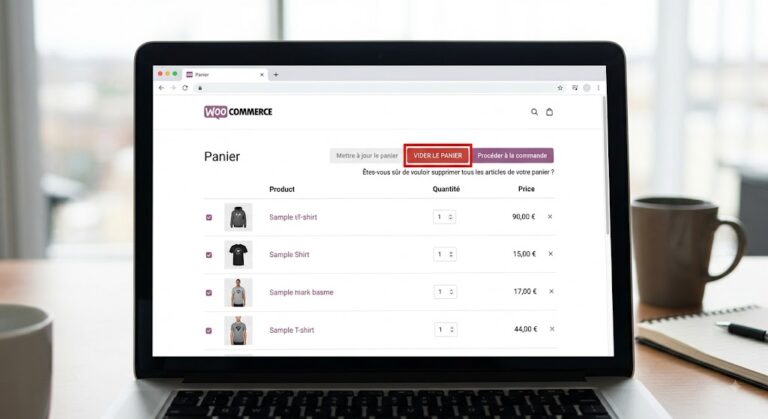
WooCommerce Button – Empty Cart
Code Snippet
WooCommerce Button – Empty Cart
// 1. Afficher le bouton sur la page panier
add_action( 'woocommerce_cart_actions', 'ajouter_bouton_vider_panier' );
function ajouter_bouton_vider_panier() {
$cart_url = wc_get_cart_url();
$clear_url = add_query_arg( 'empty-cart', 'true', $cart_url );

echo '<a class="button empty-cart-button" href="' . esc_url( $clear_url ) . '">Vider le panier</a>';
}

// 2. Traiter la demande et vider le panier
add_action( 'template_redirect', 'executer_vidage_panier' );
function executer_vidage_panier() {
if ( is_cart() && isset( $_GET['empty-cart'] ) && $_GET['empty-cart'] === 'true' ) {
WC()->cart->empty_cart();
wc_add_notice( __( 'Le panier a été entièrement vidé.', 'woocommerce' ), 'notice' );

wp_safe_redirect( wc_get_cart_url() );
exit;
}
}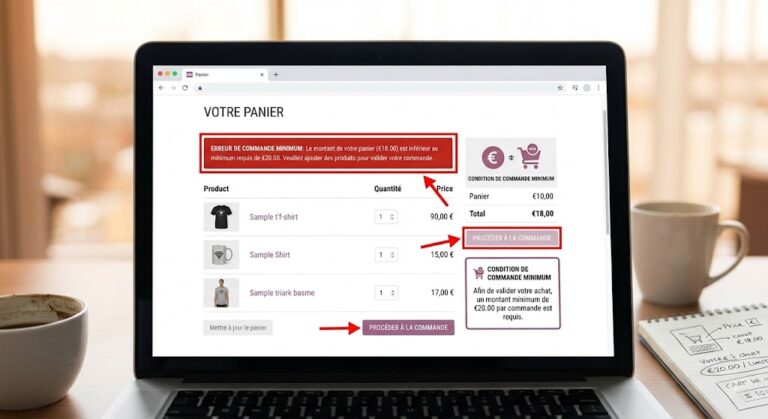
Définir un montant minimum de commande obligatoire
Code Snippet
Définir un montant minimum de commande obligatoire
// 1. Afficher l'avertissement sur la page panier et le checkout add_action( 'woocommerce_before_cart', 'afficher_notice_montant_minimum' ); add_action( 'woocommerce_checkout_process', 'afficher_notice_montant_minimum' ); function afficher_notice_montant_minimum() { $minimum = 100; // Montant minimum requis if ( WC()->cart->subtotal < $minimum ) { $message = sprintf( 'Le montant minimum de commande est de %s. Votre sous-total actuel est de %s.', wc_price( $minimum ), wc_price( WC()->cart->subtotal ) ); if ( is_cart() ) { wc_print_notice( $message, 'error' ); } else { wc_add_notice( $message, 'error' ); } } } // 2. Retirer le bouton "Commander" de la page panier sous le seuil add_action( 'woocommerce_proceed_to_checkout', 'masquer_bouton_commander_si_seuil_non_atteint', 1 ); function masquer_bouton_commander_si_seuil_non_atteint() { $minimum = 100; // Montant minimum requis if ( WC()->cart->subtotal < $minimum ) { // Supprime l'action par défaut qui affiche le bouton "Valider la commande" remove_action( 'woocommerce_proceed_to_checkout', 'woocommerce_button_proceed_to_checkout', 20 ); } }Set a Mandatory Minimum Order Amount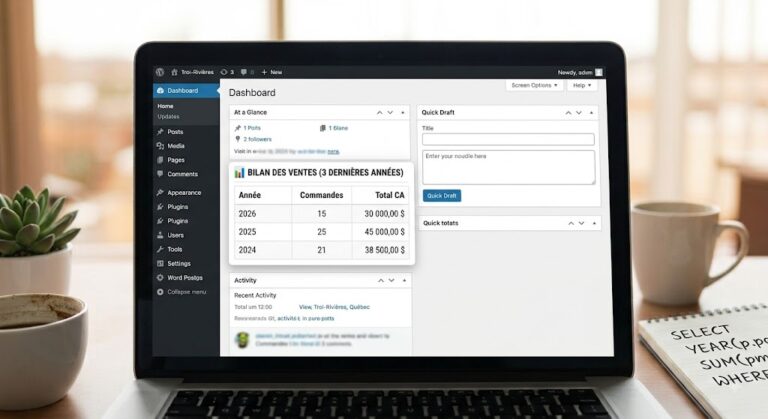
Revenue Report for the Last 3 Years – WordPress Dashboard
Code Snippet
Revenue Report for the Last 3 Years – WordPress Dashboard
// 1. Ajouter un widget personnalisé au tableau de bord WordPress
add_action( 'wp_dashboard_setup', 'ajouter_widget_statistiques_3_ans' );

function ajouter_widget_statistiques_3_ans() {
wp_add_dashboard_widget(
'statistiques_ventes_3_ans',
'📊 Bilan des Ventes (3 Dernières Années)',
'afficher_contenu_widget_statistiques'
);
}

// 2. Requête SQL directe et affichage des résultats
function afficher_contenu_widget_statistiques() {
global $wpdb;

$annee_actuelle = (int) date( 'Y' );
$annee_depart = $annee_actuelle - 2; // Inclus l'année en cours + les 2 précédentes

// Requête SQL compatible avec les tables WooCommerce modernes (HPOS) et classiques (wp_posts)
$sql = "
SELECT
YEAR(p.post_date) AS annee,
COUNT(p.ID) AS total_commandes,
SUM(pm.meta_value) AS chiffre_affaires
FROM {$wpdb->posts} p
INNER JOIN {$wpdb->postmeta} pm ON p.ID = pm.post_id
WHERE p.post_type = 'shop_order'
AND p.post_status IN ('wc-completed', 'wc-processing')
AND pm.meta_key = '_order_total'
AND YEAR(p.post_date) >= %d
GROUP BY YEAR(p.post_date)
ORDER BY annee DESC
";

$resultats = $wpdb->get_results( $wpdb->prepare( $sql, $annee_depart ) );

if ( empty( $resultats ) ) {
echo '

Aucune commande terminée ou en cours de traitement trouvée pour ces 3 dernières années.

';
return;
}

echo '
<table style="width: 100%; border-collapse: collapse; text-align: left;">
<tbody>
<tr style="border-bottom: 2px solid #ccc; font-weight: bold;">
<th style="padding: 8px;">Année</th>
<th style="padding: 8px;">Commandes</th>
<th style="padding: 8px;">Total CA</th>
</tr>
<tr style="border-bottom: 1px solid #eee;">
<td><strong>' . esc_html( $ligne->annee ) . '</strong></td>
<td>' . esc_html( number_format_i18n( $ligne->total_commandes ) ) . '</td>
<td>' . wc_price( $ligne->chiffre_affaires ) . '</td>
</tr>
</tbody>
</table>
';echo '';foreach ( $resultats as $ligne ) {
echo '';echo ' ';
echo '';
echo '';
echo '';
echo '';
}echo '

';
}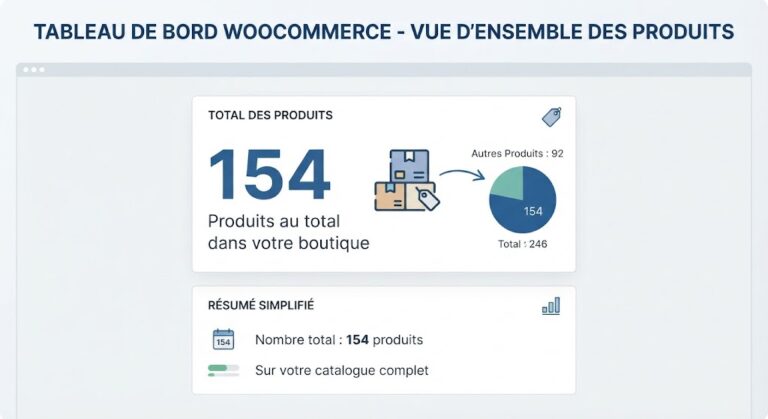
Display the Total Number of WooCommerce Products
Code Snippet
Display the Total Number of WooCommerce Products
function mon_site_afficher_total_produits() {
if ( ! post_type_exists( 'product' ) ) {
return '';
}

$product_counts = wp_count_posts( 'product' );
$total_products = isset( $product_counts->publish ) ? (int) $product_counts->publish : 0;

return esc_html( number_format_i18n( $total_products ) );
}
add_shortcode( 'total_produits', 'mon_site_afficher_total_produits' );
WooCommerce: Detect Products Without Images – Display an Alert Column in the Product List.
Code Snippet
WooCommerce: Detect Products Without Images – Display an Alert Column in the Product List.
add_filter( 'manage_edit-product_columns', function( $columns ) {
$new_columns = array();

foreach ( $columns as $key => $label ) {
$new_columns[ $key ] = $label;

if ( 'thumb' === $key ) {
$new_columns['product_image_alert'] = __( 'Image', 'your-textdomain' );
}
}

return $new_columns;
} );

add_action( 'manage_product_posts_custom_column', function( $column, $post_id ) {
if ( 'product_image_alert' !== $column ) {
return;
}

if ( has_post_thumbnail( $post_id ) ) {
echo '';
return;
}

echo '';
} , 10, 2 );

add_action( 'admin_head-edit.php', function() {
$screen = get_current_screen();

if ( ! $screen || 'edit-product' !== $screen->id ) {
return;
}

echo '

<style>.column-product_image_alert { width: 70px; text-align: center; }</style>

';
} );